Turn every automated message off with one switch.
Boat dealer automation controls on one page. A controls page with a master switch and a named trigger for each kind of automated message, so every automated message is managed from one page.
Safe by default.
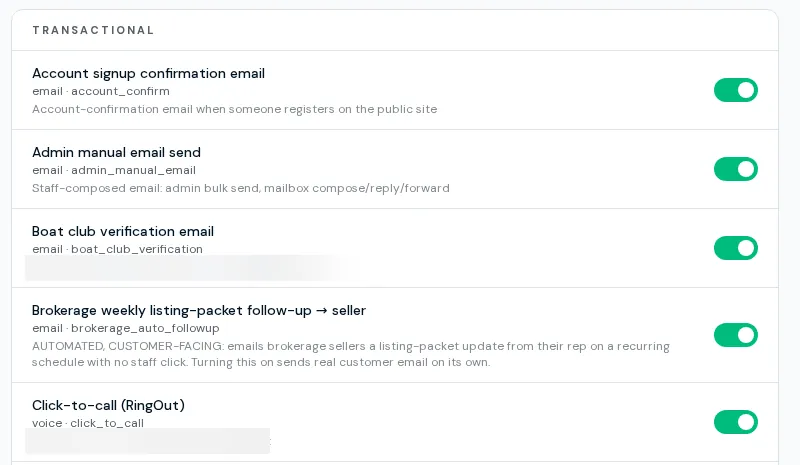
Boat dealer automation controls start with the master switch. The master switch stops all outward communication. Under it, each trigger such as the new-lead alert, lead auto-reply, rep mass mail, outbound SMS, e-sign requests and each sales-automation step has its own toggle, grouped by category, with a hint when the master switch is blocking it. A trigger with no setting counts as disabled.
- Master kill switch for all outward communication
- 29 named triggers, each with channel and label
- Separate switch for the subscriber email pipeline
- Lead auto-reply template picker
- Missing trigger row equals off
- Admin edits; others see read-only
Using the controls
- 01
Open Controls
It is in the site admin under communications.
- 02
Flip the master switch
Everything stops. Turning it back restores the individual triggers.
- 03
Tune single triggers
Turn off one alert or auto-reply without touching the rest.
- 04
Check the log
Sends appear in communication history and observability.
Limits
Form auto-responses are partly built
Only the subscriber welcome email sends from that page today. Other per-form email rows and all SMS auto-responses save settings but nothing sends from them.
The department router only suggests
AI can suggest sales, service or parts for review. It moves nothing on its own.
Admin only
Only admins can change the switches.
Some triggers have no sender yet
At least one trigger is defined without a sender behind it.
What dealers ask about this
Use the master switch or the single trigger. Missing settings default to off.
Yes, in communication history and observability.
Newsletters also run through this master switch and a suppression check that fails closed.