Type the manufacturer's offer once and get the banner, blog, email and social drafts.
Manufacturer promotions for boat dealers, entered once. A four-step wizard turns an OEM promotion into a placed banner and reviewed drafts for the blog, email and social, and takes the offer down when it ends.
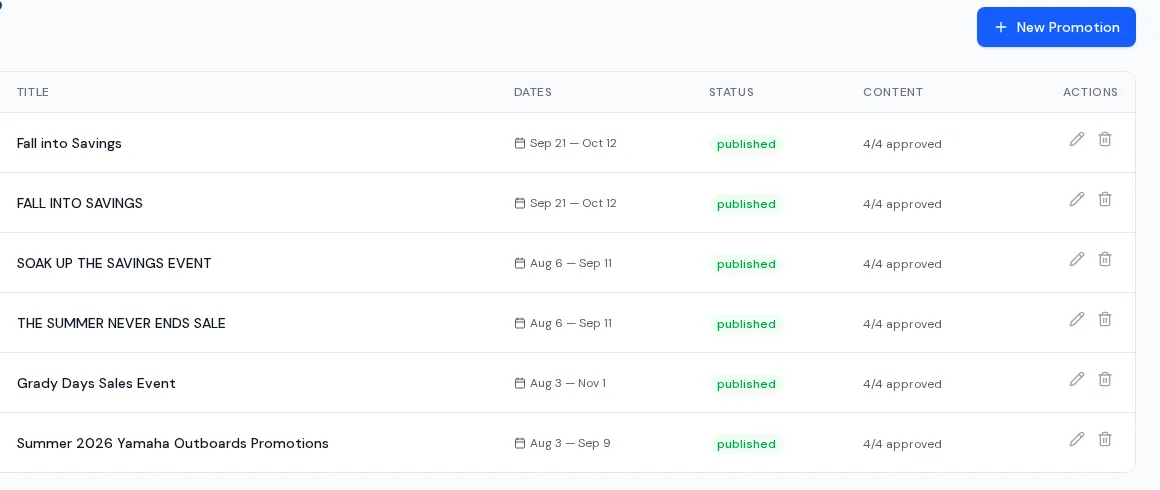
One offer, four places, no re-keying.
Manufacturer promotions for boat dealers usually mean retyping the same offer five times. You enter the manufacturer's verbatim details, your own framing, dates and model years. The tool shows every page where the banner will appear, then drafts a blog post, a newsletter and per-network social captions from the manufacturer copy. A person reviews each draft before anything goes out.
- Banner shown only while the promotion is published and today is inside its dates
- Appears on the homepage, promotions page, brand and model pages, filtered new-boat lists and matching boat pages (new inventory only)
- Preview of the banner and a list of exactly where it will appear
- AI drafts a blog post, a newsletter and social captions, all editable
- Post now, schedule or save as draft for social; per-network results after publishing
- Promotional blog posts listed next to the promotion
How the wizard runs
- 01
Details
Choose the manufacturer, paste the offer, add dates, model years, links and images.
- 02
Banner and placement
Preview the banner and see every page it will show on.
- 03
Blog and newsletter
Generate drafts from the manufacturer copy, then edit and approve.
- 04
Social
Edit captions, pick connected networks and post now, schedule or keep as a draft.
Limits
New inventory only
Promotions display on new boats. Used inventory does not carry them.
Fixed manufacturer list
The manufacturer picker is a set list for now; adding a brand is a change we make for you.
Blog publishes immediately
Scheduling in the wizard applies to social posts. The linked blog post goes live when you publish.
Social depends on connected networks
Unconnected networks are skipped and reported. See social publishing for which networks work.
What dealers ask about this
No. It shows only while it is published and inside its start and end dates.
No. Every draft is reviewed and posted by a person from the wizard.
Co-op tracking is a separate tool. See co-op tracker.