Open the day on your own numbers.
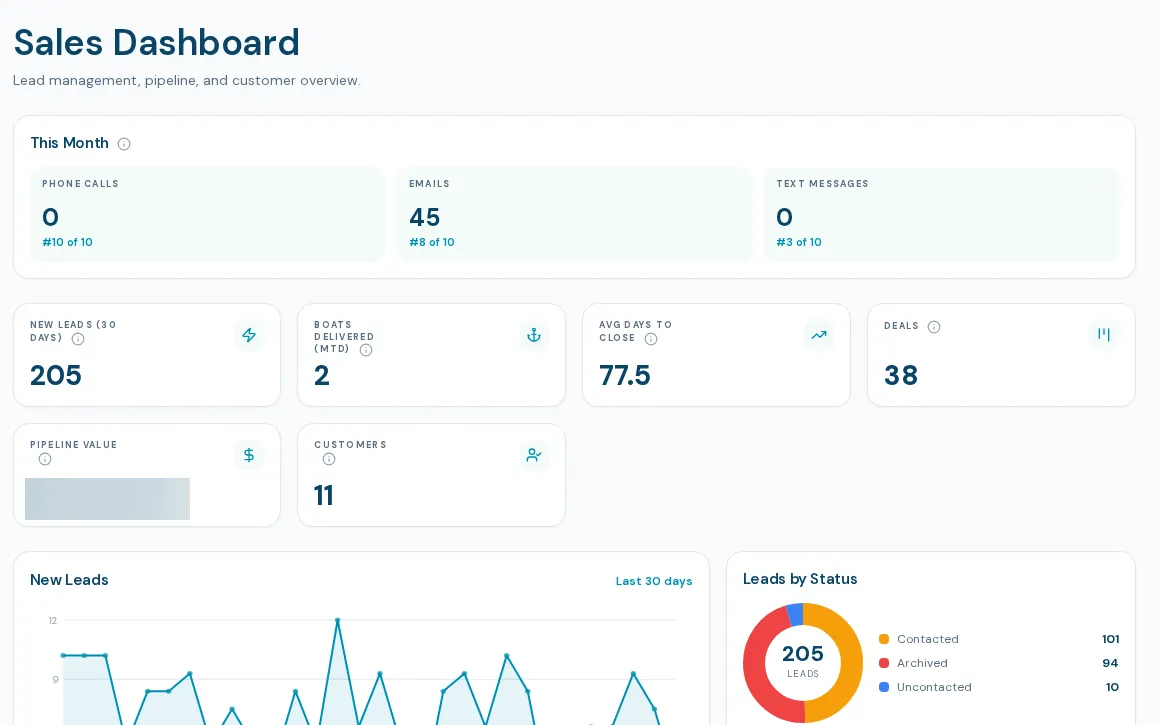
A boat sales rep dashboard for the start of the day. Reps see their own book; managers see the team. New leads, open deals, pipeline value and who is working the phones, refreshed as you watch.
One screen for the sales day
Think of it as the boat sales rep dashboard that keeps each person on their own numbers. The dashboard scopes every figure to the viewer: a rep sees their own leads and deals, and a manager sees the team. It refreshes about every thirty seconds and has separate phone and desktop layouts.
- KPI tiles: new leads in 30 days, boats delivered this month, average days to close, deals, pipeline value and customers
- Trends and lists: new leads by day, leads by status, funnel, deals by stage, leads by source
- This month strip ranking calls, emails and texts by rep
- Rep performance table with new leads, emails, calls, open deals and closed this month
- Recent leads, active deals and quick links
- My Customers: a rep's book with birthdays and purchase anniversaries, and bulk email to selected customers
How reps and managers use it
- 01
Open the dashboard
A rep lands on their own numbers. A manager, general manager or admin sees the whole team.
- 02
Work from the lists
Recent leads and active deals link straight to the lead file and deal.
- 03
Use the relationship prompts
Birthdays and purchase anniversaries prefill an email or text draft. Nothing sends from the button itself.
- 04
Send to a group
From My Customers, select customers and send a personal email as yourself, with unsubscribed addresses excluded.
What the sales dashboard does not do yet
Team-wide detail is for managers
Reps see their own book. The team comparison views belong to the Sales Manager console.
Call and email counts are what is logged
Counts reflect calls on connected lines and email in connected mailboxes, so a rep who is not connected shows low.
Occasion prompts depend on data
Birthday and anniversary lists rely on the dates being recorded on the customer. The daily bell and task version depends on a setting we have not confirmed is switched on everywhere.
What dealers ask about this
Each rep sees their own leads and deals. The this-month ranking strip shows calls, emails and texts ranked across the sales team.
It refreshes about every thirty seconds and keeps the old data on screen while it reloads.
No. There is no export of dashboard figures today.